 Do you have an iPad? If not, WHY NOT!?!?!? 😀
We got our iPad right after it came out in 2010, and I must say, it has essentially replaced my laptop for any time I need a computer but am not sitting at my desk. There’s a darn good reason Oprah named it one of her Ultimate Favorite Things.
But for dentists, IMO, there is now a completely different reason for the iPad to become one of YOUR ultimate favorite things, and that is one particular app: DDS GP.
Use Your Own Photos to Educate Your Dental Patients
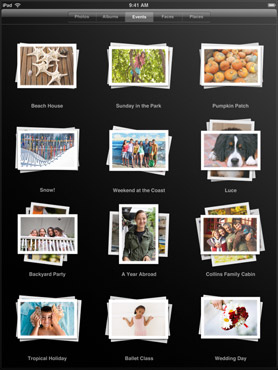
One of the best features of this app, is the ability to add your own patient photos to individual presentations. All you have to do is create a folder of pictures to sync to the iPad, and from within the app, select the photos to add to each presentation, with no limit. So add Before/After Portraits — composites, amalgams, CERECs, and more! Then put the iPad in your patients’ hands and simply WOW them!
%CODE1%
Customizable, Portable, & Easy-to-Learn for Dentists and Dental Teams
The DDS GP app currently has more than 200 different presentations, and more are being added regularly. They include such procedures and diagnoses as:
- Bleaching: In Office
- Bone Graft with Extraction
- Bridge: Porcelain, Anterior
- Crown-Lengthening
- Brushing: Bass Technique
- Cracked Tooth, Cusp
- Crown: CEREC
- Invisalign
- Nightguard: NTI
- Veneer, Single: Porcelain, Lab
Affordable Dental Case Presentation Software vs. CASEY or GURU
Unlike Patterson Dental’s CASEY (which can run up to $8000) or Henry-Schein’s GURU (not sure, but I have heard about $2000?), DDS GP is truly affordable — only $399! No, I am not kidding, AND that includes free lifetime updates! No, I am not kidding about that, either.
Email Treatment Plans, Add Fees, Include the Presentations, & More
From directly within the app, you can create treatment plans and add presentations from the app, then send it right to your patient via email, or if you have a compatible printer, print it directly from your iPad. This makes it easy for husbands or wives to show their spouses the same, easy-to-understand presentations that helped them make the decision to move forward on treatment.
awesome product.. Every dentist should have this in their office
This product looks like crap, no visual quality. I have seen it in action.
Sorry to hear you feel that way, Simon, but I will vigorously disagree with you. It functions quite well, has solid graphics that IMO explain conditions and procedures visually in a way that my patients easily understand, and the price point is almost impossible to beat, especially with lifetime upgrades included.
But you’re entitled to your opinion of course.
I do not care about the price of the other two options. I want a company behind the product I am buying. This is only an “app”. I will not buy something that can help my practice at the same place that I can buy angry birds. This is ridiculous, Idiotic and a complete waste of $399.
Sean, just wondering if you’ve actually tried DDS GP, especially after some of the recent updates? And really, your criticism is almost completely off-base. Kick Your Apps, Inc is a true company that now has a history of very good customer service, and Marcus is available for help very easily, especially on DentalTown.com. They’ve been very responsive to critique and requests for improvements.
Compare that to something like CAESEY or GURU — does it really matter how many times you ask for an update or improvement? Do they really listen? I mean, we’re talking about Patterson or Schein, after all, neither of which has a great track record for listening to their user requests.
And in terms of cost……personally, I love the fact that this “only an app” program is only $400 with free lifetime updates. Buy a refurbished iPad for $299, and you have a great communication tool that is portable, customizable, effective, and a definite “cool” factor.
But hey – if you want to spend how many thousands of dollars for CAESEY or GURU – that’s your right. But my personal opinion is that those are ridiculous, idiotic, and a complete waste of thousands of dollars. 😉 😉 🙂