Do you have a website for your practice? If not………what in the world are you waiting for????? If yes………does it generate a steady flow of New Patients and Revenue for you? If yes, that’s awesome, and if not, what are you doing to change that?
Dental Websites and YOUR Pictures are a Necessity
As I previously mentioned in a post about Dr. Mike Barr’s Website Owner’s Manual for Dentists, I am not an “expert” on websites by any stretch of the imagination, although I’ve certainly worked hard to learn a lot since early 2009. But yes, my websites are in toto the Number 1 source of New Patients and Monthly Revenue for my practice (in March 2011 alone, over $40,000), so I certainly have some success. Part of that success IMO, is the pictures of my own patients and my own work that are plastered all over them. And yes, I make it quite clear by my watermarks and statements that those are my own, not stock images that anyone can get, nor images stolen from a colleague.
Your Photos Create Instant Credibility
Why do I believe it is so crucial to have your own pictures online, whether your website, your Facebook Fan Page, a Flickr gallery, etc? Certainly, one of the biggest reasons is credibility. Remember that a new patient visiting your site has absolutely no idea how good (clinically speaking) a dentist you are. You, or your website copywriter, may be amazingly eloquent and gifted with words, but as they say, “A picture is worth a thousand words,” and if a new patient stumbles on your site and sees work clearly marked as yours, if they’re impressed, then you have automatically gained authority in that person’s eyes. They can see what YOU do, not someone else. Take the 2 examples below:
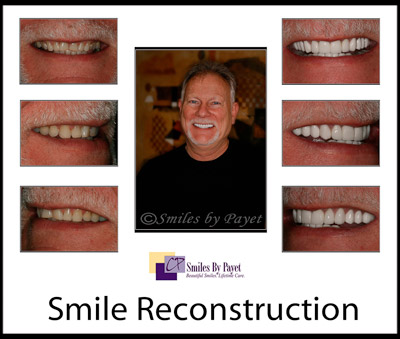
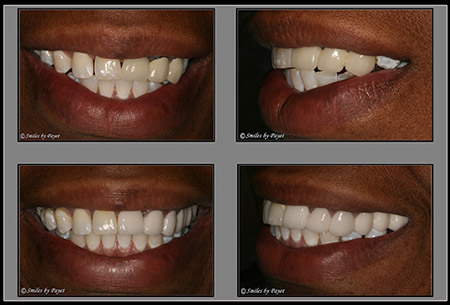
What do you think a patient thinks when s/he sees these? “Wow, that doctor does some pretty nice work! That’s just want I’m looking for.”
In comparison, read Mike’s humorous but on-target post about the most commonly seen women on the web, and after a patient has seen those pictures on 5-10 sites, what will that prospective patient think? “……….NEXT!!!!”
Website Optimization with Photos
Besides the credibility/authority that you gain by showcasing your own work and pictures, there’s another key function of photos in your website: getting found by the search engines, or “optimizing” them.
So how do you “optimize” a picture to aid in improving your web presence? As with most anything, it has to do with keywords. At the moment, though, you are probably thinking, “Where in the world do you put keywords in a picture!?!?!?” right? Well, they go in the code “behind” the picture, so-to-speak. So what does that look like?
If you really want to see what all the code looks like that makes up a website, in most cases, all you have to do is click “Control-U,” and a new tab or window will open in your browser with what looks like a foreign language, and really, that’s what it is. As you scroll down, you will occasionally come across some code like this:
<a href=”cosmetic-dentistry.htm”><img src=”images/porcelain-veneers-before-after-1.jpg” alt=”Porcelain dental veneers, by experienced cosmetic dentist Dr. X, create beautiful new smiles.” width=”150″ height=”105″ />
There may be more, but the highlighted texts are the parts you want to know and use, because that’s where you add the relevant keywords for Googlebots to find as they are scanning your site. More information on each of them can be found in my recent blog post on boosting your dental SERPs with image optimization.
(More to be added soon 😀 )